
Duplicate rows are one of the most common data-quality problems in any database. They inflate totals, break reports and cause unique-key errors when you try to fix them later. In this guide you will learn how to find duplicate rows in SQL with five practical methods, how to delete them safely, and how to stop them from coming back. Every example works in MySQL 8+, PostgreSQL and SQL Server, with notes where the syntax differs.
The sample table
All examples use a small customers table where the same person was imported more than once:
CREATE TABLE customers (
  id      INT PRIMARY KEY,
  name    VARCHAR(100),
  email   VARCHAR(150),
  city    VARCHAR(80)
);

INSERT INTO customers VALUES
(1, 'Sara Ali',   'sara@example.com',  'Cairo'),
(2, 'Omar Adel',  'omar@example.com',  'Giza'),
(3, 'Sara Ali',   'sara@example.com',  'Cairo'),
(4, 'Mona Samir', 'mona@example.com',  'Alexandria'),
(5, 'Omar Adel',  'omar@example.com',  'Giza'),
(6, 'Sara Ali',   'sara@example.com',  'Cairo');
Rows 1, 3 and 6 are the same customer, and rows 2 and 5 are another duplicate pair. Notice that the id is different on every row, so a “duplicate” here means the same values in the columns that matter (name, email, city), not identical rows.
Method 1: GROUP BY with HAVING COUNT(*) > 1
This is the classic and fastest way to see which values are duplicated and how many times:
SELECT name, email, city, COUNT(*) AS copies
FROM customers
GROUP BY name, email, city
HAVING COUNT(*) > 1;| name | city | copies | |
|---|---|---|---|
| Sara Ali | sara@example.com | Cairo | 3 |
| Omar Adel | omar@example.com | Giza | 2 |
When to use it: quick checks and reports. Its limitation is that it returns one row per group, so you don’t see the individual id values.
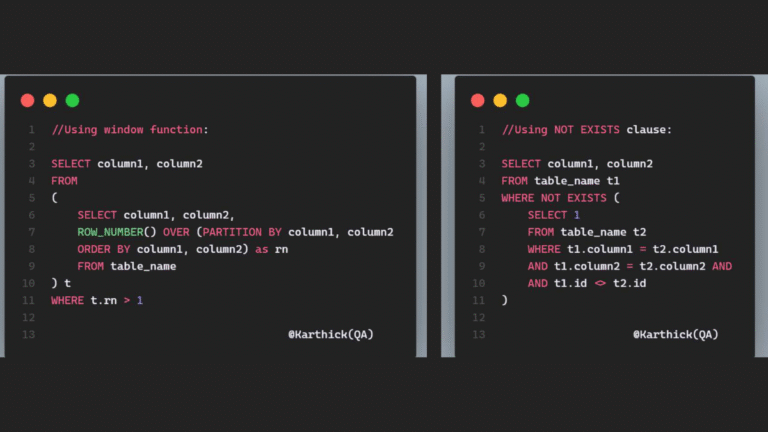
Method 2: ROW_NUMBER() window function
Window functions number the rows inside each group, so you can see every duplicate and decide which one to keep:
SELECT id, name, email, city,
       ROW_NUMBER() OVER (PARTITION BY name, email, city ORDER BY id) AS rn
FROM customers;
Every row with rn > 1 is an extra copy. To list only the duplicates, wrap it in a CTE:
WITH ranked AS (
  SELECT id, name, email, city,
         ROW_NUMBER() OVER (PARTITION BY name, email, city ORDER BY id) AS rn
  FROM customers
)
SELECT * FROM ranked WHERE rn > 1;   -- returns ids 3, 5 and 6
When to use it: when you need the exact rows to remove. This is the most flexible method and the one most interviewers expect.
Method 3: COUNT(*) OVER (PARTITION BY …)
If you want to see all rows that belong to a duplicate group, including the first one, use a windowed count:
SELECT *
FROM (
  SELECT c.*, COUNT(*) OVER (PARTITION BY name, email, city) AS copies
  FROM customers c
) t
WHERE copies > 1
ORDER BY email, id;
This returns rows 1, 3, 6, 2 and 5, which is handy when you need to review each group before cleaning it.
Method 4: Self JOIN
A self join compares the table with itself. It works even on old database versions without window functions:
SELECT DISTINCT a.*
FROM customers a
JOIN customers b
  ON  a.email = b.email
  AND a.name  = b.name
  AND a.city  = b.city
  AND a.id    > b.id;      -- a is a later copy of b
The condition a.id > b.id keeps the row with the smallest id as the “original” and returns only the later copies.
Method 5: EXISTS
EXISTS reads naturally: “show rows for which an earlier copy exists”. On large tables with the right index it is often very fast:
SELECT *
FROM customers a
WHERE EXISTS (
  SELECT 1 FROM customers b
  WHERE b.email = a.email
    AND b.name  = a.name
    AND b.city  = a.city
    AND b.id    < a.id
);
Which method should you use?
| Method | Shows individual rows | Best for |
|---|---|---|
| GROUP BY + HAVING | No | Counting duplicates, quick checks |
| ROW_NUMBER() | Yes | Deleting extras, choosing which row to keep |
| COUNT(*) OVER | Yes (all copies) | Reviewing whole duplicate groups |
| Self JOIN | Yes | Older databases without window functions |
| EXISTS | Yes | Large tables with good indexes |
How to delete duplicate rows safely
Always run the SELECT version first, check the result, and take a backup before deleting. Then keep the first copy (lowest id) and delete the rest.
PostgreSQL and SQL Server
WITH ranked AS (
  SELECT id,
         ROW_NUMBER() OVER (PARTITION BY name, email, city ORDER BY id) AS rn
  FROM customers
)
DELETE FROM customers
WHERE id IN (SELECT id FROM ranked WHERE rn > 1);
MySQL 8+
MySQL does not allow deleting from a table while selecting from it in a subquery, so use a JOIN on a derived table:
DELETE c
FROM customers c
JOIN (
  SELECT id,
         ROW_NUMBER() OVER (PARTITION BY name, email, city ORDER BY id) AS rn
  FROM customers
) d ON d.id = c.id
WHERE d.rn > 1;
After the delete, run Method 1 again: it should return no rows.
How to prevent duplicates in the first place
- Add a UNIQUE constraint on the columns that define a real duplicate, for example
ALTER TABLE customers ADD CONSTRAINT uq_customer_email UNIQUE (email); - Use upserts instead of blind inserts:
INSERT … ON CONFLICT DO NOTHING(PostgreSQL),INSERT IGNOREorON DUPLICATE KEY UPDATE(MySQL), orMERGE(SQL Server). - Clean data before loading: trim spaces and normalise case, because
'Sara Ali'and'sara ali 'look different to the database. - Load into a staging table first, deduplicate there, then move clean rows to the main table.
Common mistakes
- Grouping by the primary key. If you include
idin the GROUP BY, every group has one row and you will find nothing. - Ignoring NULLs.
GROUP BYtreats NULLs as equal, but join conditions such asa.city = b.citydo not match NULLs. UseCOALESCE(city, '')in joins if NULLs are possible. - Deleting without ORDER BY in the window. Without
ORDER BY idinsideROW_NUMBER(), the database may keep a random copy.
Frequently Asked Questions
How do I find duplicates in one column only?
Group by that column alone: SELECT email, COUNT(*) FROM customers GROUP BY email HAVING COUNT(*) > 1;
How do I find duplicate rows across all columns?
List every column except the surrogate key (such as an auto-increment id) in the GROUP BY or PARTITION BY clause.
What is the difference between DISTINCT and finding duplicates?
SELECT DISTINCT hides duplicates in a query result but leaves them in the table. The methods above identify the duplicate rows so you can fix the data itself.
Is this a common SQL interview question?
Yes. “Find and delete duplicate rows” is one of the most frequently asked SQL interview questions. Be ready to explain both the GROUP BY … HAVING answer and the ROW_NUMBER() answer.
Free PDF and related resources
Want a printable summary? Download the short SQL Find Duplicate Rows PDF guide, and keep practising with these free resources: